
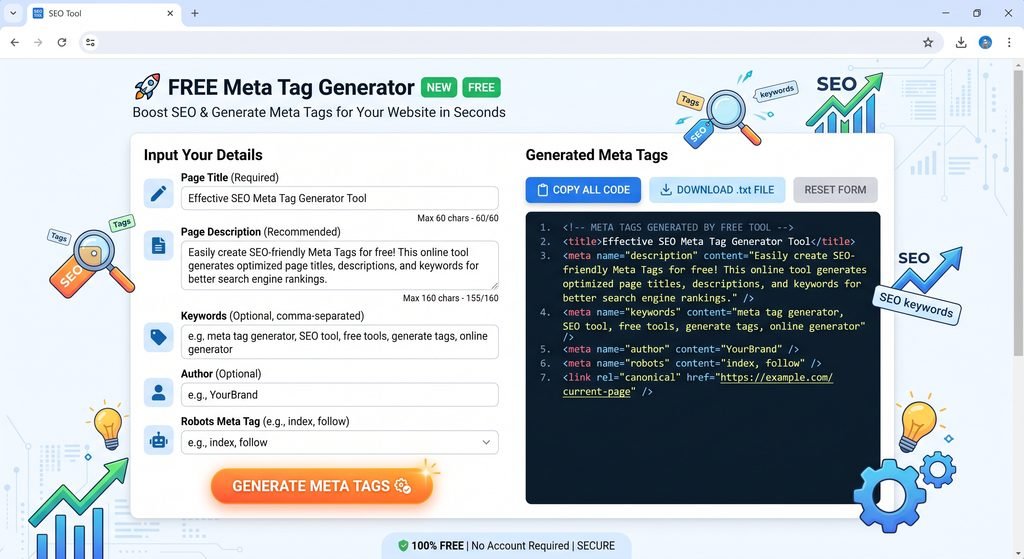
Meta Tag Generator is a free web-based application used by webmasters, bloggers, web developers, and SEO experts to create HTML meta tags effortlessly. Meta tags are tags in HTML coding that offer vital information regarding a web page to both search engines and browsers. They allow users to identify the page title, description, author, keywords, and viewport of the page among others. Through this application, all that one has to do is fill the provided fields with the appropriate data and then click on Generate Meta Tags button. This automatically generates HTML meta tags that can be copy and pasted into the section of the website. This application allows users to generate HTML meta tags for page title, meta description, keywords, author, character encoding, and responsive viewport. It operates directly from your web browser and requires no software installation whatsoever.
Meta Tag Generator
Generate clean and ready-to-use HTML meta tags for your website in seconds.
Generated Meta Tags
Free Meta Tag Generator Online
Short Introduction
Generate meta tags for your website using HTML within seconds. Provide details of your website and produce the required code to insert in the header of your website.
How to Use the Meta Tag Generator?
Step 1: Enter Your Page Title
Input your desired page title that will appear in your HTML tag.
Step 2: Enter Meta Description
Input a brief description that gives meaning to what your webpage is all about.
Step 3: Input Keywords
Put in your relevant keywords separated by commas.
Step 4: Input Author
Specify your website or content author name if necessary.
Step 5: Choose Viewport
Pick from the responsive viewport option recommended for today’s websites.
Step 6: Generate Meta Tags
Press Generate Meta Tags to generate your HTML tags.
Step 7: Copy the Code
Click Copy Code and copy your generated HTML tags into your HTML page’s .
🚀 Why Use Our Meta Tag Generator?
- It is free
- You don’t need to register for using it
- There is no need to install any software
- Instant generation of HTML meta tag codes
- Beginner-friendly service
- Also beneficial for SEO specialists
- It is mobile friendly
- Works on all devices such as Desktop, Tablet, and Mobile
- Simply copy the generated code with just one click
- Generates HTML codes for you
Frequently Asked Questions
What is a Meta Tag Generator?
A Meta Tag Generator is an online tool that creates HTML meta tags based on information you enter, such as your page title, description, keywords, author, and viewport settings.
Is the Meta Tag Generator free of charge?
Yes. It allows users to generate meta tags for their web pages without any fee and installation of any programs.
What is the meta description?
The meta description tag is the HTML element that contains a brief description of the webpage. Sometimes it can be used by search engines to describe the page in its results.
Are meta tags valuable for SEO?
Some meta tags can help search engines and browsers to find useful information about your page. The title and meta description are very valuable meta tags in order to understand the theme of the page.
Does the keyword meta tag influence Google ranking?
Google does not use the meta keywords tag as a ranking factor but it still can be generated for other reasons by this generator.
Where do I need to place my meta tags?
Most of the meta tags have to be put in the head of the HTML document.

No Comment! Be the first one.